Integrations
BusinesscardscannerforyourCRM.
Scan a business card once, then send the contact to Zoho CRM, HubSpot, Salesforce, or Pipedrive—or export a clean Excel file.
ExpoSnap contact
Ready to sync
CRM-ready out of the box
ExportbusinesscardstoExcel.
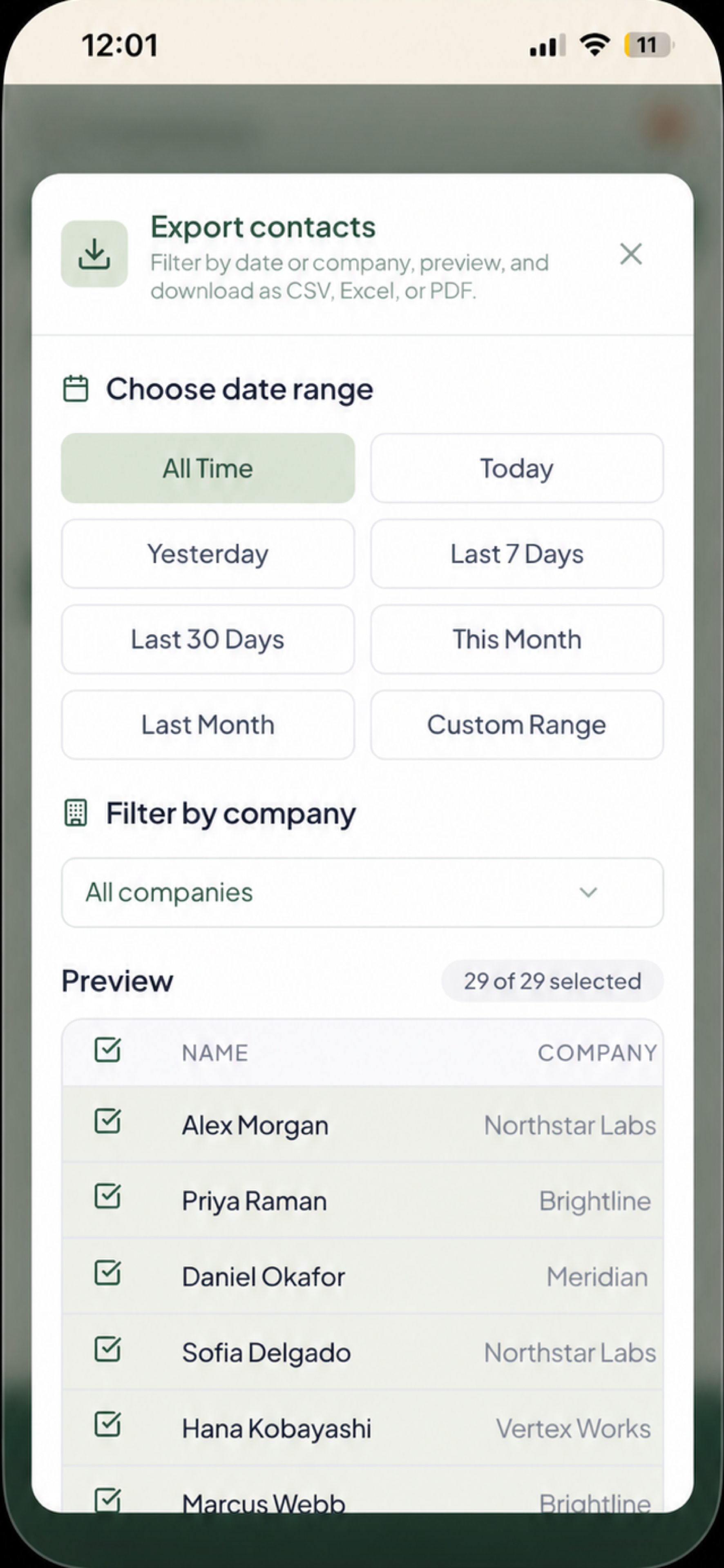
Export scanned business cards to Excel, CSV, or PDF with the contact fields your CRM expects. Filter by date range or company before download.
Map once
ExpoSnap shapes every contact into the fields your CRM already expects.
Your connection
Each user authorizes their own CRM account through OAuth.
Control the handoff
Filter the list, review the lead, then sync or export.
Connect your stack
SyncscannedcontactstoZohoCRMandmore.
CSV · Excel · PDF
Any CRM, any spreadsheet
Works with everything, today
HubSpot
Synced as Contacts
Connect your account
Salesforce
Synced as Leads
Connect your account
Pipedrive
Synced as Persons
Connect your account
Zoho CRM
Synced as Leads
Connect your account
Direct sync uses per-user OAuth — you connect your own CRM account; there is no shared connection pooling your leads with anyone else's.
The flow
Scan business cards
AI converts each card into a structured, searchable contact record.
Review and filter
Choose the contacts you want by date range or company before handoff.
Export or sync
Download Excel, CSV, or PDF, or send contacts to HubSpot, Salesforce, Pipedrive, or Zoho CRM.
Step-by-step guides